

Deploying IBM Lotus Connections: Planning and architecture considerations
Stephen Hardison has just published part 1 of a six-part series about “Deploying IBM Lotus Connections“.
In part 1 he writes about the most common steps to prepare for an IBM Lotus Connections deployment and the architectural concepts of a Lotus Connections installation.
Update: Now also available
Part 2: “Post-installation tuning”
Part 3: “Maintenance”
Part 4: Troubleshooting
Robocopy Exit Codes
Weil ich sie gerade gebraucht habe und nicht griffbereit hatte, hier ein Link auf die Exit-Codes von ROBOCOPY.
Lotus Quickr: “My Places” does not show all places
On a customer installation we did had the problem that the users could not see all of the places they had access to in the “My Places” view.
Some of the places appeared and some others did not. We could not find any things in common for the places which were visible. The only thing we saw was that none of the newly created places were displayed.
We then de-registered all places and registered them once again. This made it even worse as none of the places were visible now.
It took us a long time to find out what the reason for that behaviour was.
The customer changed the DNS name of the Quickr server some time after the installation from “SERVERNAME.domain.com” to “servername.domain.com”. The name was changed also in the Domino server document.
But Quickr stores the server name also in the database “PlaceCatalog.nsf” in the root of Domino data (you can see the servers known to Quickr in this database in the view “Place Servers”). In this database the server name was still listed with capital letters. As the place names do have a connection to the server name, Quickr did only found a match for places created as the server name still had capital letters in its name. All newly created places (which got the server name in small letters) were not be recognized as places for this server.
After de-registering and registering all places they were connected to the current server name (in small letters). So none of the places did match with the old server name in capital letters which was still listed in the PlaceCatalog.nsf.
After changing the field in PlacesCatalog.nsf and restarting the HTTP task all places were displayed again with no problem.
Instead of manually changing the server one could also de-register the server and register it again (although you will then get a second entry in the “Place Servers” view).
Lotus Quickr: Problem with customizing themes
If you want to create a customized theme for Lotus Quickr (Services for Domino) you normally start with one of the default themes. I wanted to use the default theme “Quickr (with classic navigation)” and so I activated this theme and afterwards clicked on “Custom Themes” -> “Create Custom Theme”. What I now expected was that if I activate the “Generate” option for all HTML/CSS files I will get the original version of the theme I had activated before (“Quickr (with classic navigation)”).
Unfortunately this seems not to be the case. What I did get was the CSS file of the old Quickplace theme (“Quickplace Classic”) and some HTML files which do not match with any of the standard themes.
So if you want to use a standard theme as starting point for a new theme you should copy the 6 files (StyleSheet.css, Page.htm, Edit.htm, Headlines.htm, ListFolder.htm and SlideShow.htm) from the directory on the server (look here which theme corresponds to which directory). Then you should drag & drop all of the six files to your newly created theme. Then you can start to modify the files as you want.
Lotus Domino: View Rebuild and temporary space
Starting with R5 Lotus Domino is able to rebuild the database views much faster than this was the case with R4.
To be able to use the new rebuild mechanism Domino needs enough disk space in the temp directory.
If there is not enough space you see the following error in the log: “Warning: unable to use optimized view rebuild for Viewname due to insufficient disk space …. Using standard rebuild instead”.
In this case you really should take care of the problem as the standard rebuild takes much more time. We currently measured some hours instead of 30 minutes when rebuilding the views of the Domino Directory or the ADMIN4.NSF after an R7 upgrade.
The amount of disk space needed was almost up to 10 GigaBytes which was not available on the system drive.
You can either delete some files if possible or you can move the directory where the indexer task writes its temporary files to another location by using the NOTES.INI variable “view_rebuild_dir=X:\pathname\”. You have to restart the server after you change this variable.
No business case ….
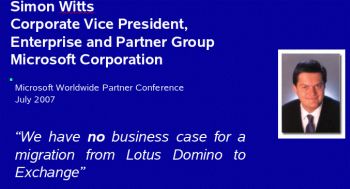
Ok, so why then migrating!?
Lotus Quickr: How to read the documentation offline?
Currently the Lotus Quickr documentation is only available online.
To read the documentation offline you have two possibilities:
Print the online documentation either to a printer or to a PDF file.
You can do this by clicking on the small arrow which appears when you move the mouse pointer over a topic:
Then you select “Print this topic” or “Print this topic and subtopics”:

A disadvantage is that you only can print 100 topics at one time. So you have to print the whole documentation in smaller pieces.
The other possibility to read the documentation offline is to install the “IBM User Interface Help System built on Eclipse”.
This is the same help system used online but runs on your local PC. You can download the help system here.
After you installed the help system (you will need to have Java installed also) you need to install the Quickr documentation plugins. As far as I know there is currently no official download site available. So in the meantime you can download them from my private FTP server (unfortunately not very fast). I will update the link as soons as it is officially available.
IBM Lotus Domino: Change HTTP Password requests show error in ADMIN4.NSF
After upgrading a hub server this weekend to Domino R7 we had the problem that all HTTP Password Change requests in the ADMIN4.NSF ran into an error and the HTTP passwords were no longer changed:
Person documents for the ‘Name(s) acted upon’ were found in multiple trusted directories for which this server is the Administration Server.
Person documents for Joe User/Acme were found in two trusted directories used by AcmeServer/SVR/Acme: Acme’s Address Book and AmceCo Extended Directory Catalog.
We only found some hints which said that we should remove the administration server from the Extended Directory Catalog. But this directory catalog did not have an admin server defined in our environment.
The problem was that the extended directory catalog was set to “Trusted” in the directory assistance database. This is necessary on the mail and application servers (because users from other domains should be able to authenticate) but not necessary on the hub server.
So we set this directory catalog to “Untrusted” on the hub server and the admin requests were successful again.
IBM Lotus Quickr: Error when trying to install offline-components
When trying to install the Lotus Quickr Offline components you might get the following error message:
Unable to download file German.dat. The German language resources are not supported by the server.
Solution:
Quickr uses the DOLS (Domino Offline Services) components for offline usage. The server tries to display DOLS specific messages in the language which is defined in the default locale for Windows.
So if the defaut locale in Windows is set to “German” the server tries to display the messages in the German language.
To avoid this message you either have to switch your locale to English (which normally is not desired…) or you can enforce the server to display all DOLS related messages in English by adding the following key to the Windows registry:
[HKEY_CURRENT_USER\Software\Lotus\DOLS]
“LanguagePreset”=”English”
If you want to display the messages in the default language of the locale (e.g. in German) you should be able to do this by installing the multi-language pack on your Domino server. (I did not verify this by myself!)
Update:
I just tested it with the German language pack for Domino installed and it works without the need to use the registry key mentioned above (and in this case the german DOLS software will be downloaded).