
Strange SSO problems between Websphere Application Server and Domino using Domino LDAP

Today I had to deal with some strange single-sign-on problems between Websphere Application Server 6.1 (underneath of Lotus Connections) and Quickr (Domino) and Sametime together with a Domino LDAP directory.

Although SSO between the Domino servers worked without a problem, I was logged out as soon as I switched between the Websphere and Domino world.

[More:]

We already experienced some problems while configuring the federated repositories in WAS 6.1. as we were unable to enter “O=Acme” in the field “Distinguished name of a base entry in this repository” at the repository reference page although this was our base certifier.

The certifier was copied into the Domino directory of the LDAP server; we could see the organization and all underlying users in a LDAP browser and we were able to login with these users into Lots Connections. Only SSO to Domino was not working.

Enabling SSO debugging on the Domino server (adding “debug_sso_trace_level=2” and “websess_verbose_trace=1” to NOTES.INI) showed that the token generated by the WAS server has two times the organization in the user name (e.g. “CN=First Name/O=Acme/O=Acme”). In the LDAP browser you also could see that the entry “O=Acme” was listed below all other LDAP entries and not near the other organizational entries in the directory which also was very strange.

Looking at the certifier attributes in the LDAP browser then revealed that NO attributes existed (including the “O” attribute). So this was the explanation why you could not add “O=Acme” in the repository configuration.

Looking then at the (rather old, from 1995) certifier document in the Domino directory I realized that in the field “Issued to:” there was an entry like “/O=Acme”. Other (newer) certifiers showed something like “O=Test” in this field. I then re-saved the certifier document with a Notes 8 client without changing anything else.

And voila … the field “Issued to:” then showed the correct value “O=Acme”; in WAS you were able to set the parameter correctly and single-sign-on worked as it should.

So be aware if you are using Domino LDAP servers with old certifier documents (which you might have at most of our long-term Domino customers).

Wochenrückblick

Von Sonntag bis Donnerstag war ich auf dem ISSL Professional Symposium in Porto. 3,5 Tage voll mit sehr interessanten Vorträgen. Und endlich einmal viele Leute persönlich kennengelernt, mit denen ich bisher nur per Telefon oder Mail zu tun hatte.

Von Porto selbst habe ich leider so gut wie nichts gesehen, aber wir kommen ja bald wieder hin, da wir unsere Rundreise durch Nordportugal im Juli von Porto aus starten.

Am Freitag dann gleich zum nächsten Kundentermin. Dafür dann Samstag und Sonntag bei dem frühlingshaften Wetter im Garten mehr oder weniger gefaulenzt. Zum Abschluß heute abend zur Frühjahrsrevue im Tigerpalast gewesen.

Soviel also zu letzten Woche. Meinen (privaten) Mailstau werde ich dann hoffentlich nächste Woche abgearbeitet haben. Im Hotel in Porto gab es leider einige Probleme mit der Internetversorgung…

Workaround for Quickr 8.1 (Domino) custom theme issue

If you are creating a custom theme in Quickr 8.1 (Domino) based on the original Quickr81 design the theme will display some text fragments (…IBM copyright…) at the upper left corner and some strange characters at the bottom of every page so the theme gets unusable.

As a workaround you only need to add some extra blank lines on top of every HTML file of the theme and upload them again.

Afterwards the design looks ok again.

SNAPPS released their AnyPlace SiteMap for Quickr at no cost

SNAPPS has just released their AnyPlace Sitemap tool for Lotus Quickr FOR FREE! You had to pay US-$ 2.000 before :!:

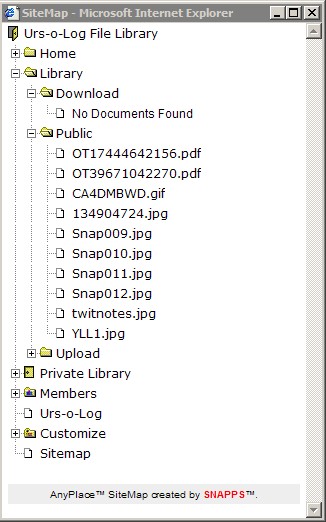
With this tool you can very easily create a site map (a small pop-up window with all your Quickr folders and documents) from where you can easily navigate to any of the documents. See this example:

[More:]

AnyPlace SiteMap

It can be implemented in any Quickr place by any place manager, no development is needed. You can customize what information is displayed (e.g. you can hide things as security, members, customize etc.).

Other AnyPlace products will be published free in the near future, as described here.

Download it from here.

Update: AnyPlace Designer has already been published there also. It is a Dreamweaver extension which helps to create themes for Quickr (Domino).

Teamplace for Quickr (Domino) with combined blogs and wikis

Lotus business partner Peters Technology Group in the US together with Lotus Development has created a template for Quickr (Domino) which combines the team place functionality with the functionality of blogs and wikis.

Unlike the QSite template of SNAPPS (which was mainly created for demonstration purposes of what is possible) this template has only the minimum of code and agents inside and can be used also in production environments.

You can download the template after registration.

Currently this template is not supported by IBM but there are ongoing discussions to change this in near future.

Update: Peters Technology group just updated the templates for use with Quickr 8.1 and have also provided now own templates with only teamplace & wiki and teamplace & blog in addition to all three ones.

Quickr 8.1 English available

I assume you already have read it on various other sources but just for completeness:

Quickr 8.1 English is available for download since today (or better since last night).

The planned eGA dates for the other languages will be:

* April 28 2008: West Europe
* May 12 2008: Nordic
* June 9 2008: Multilingual
* April 28 2008: Asia Pacific

Update:

Make sure you also download the following fixes from FixCentral:

* Required post-install fixes for Lotus Quickr 8.1 services for Lotus Domino (#1299067)
* Required post-install fixes for Lotus Quickr 8.1 services for WebSphere Portal (#1299060)

Quickr (Domino) “remembers” old place names

After I did a clean re-install of Quickr on my demo Domino server I noticed that Quickr seems to remember some old place names although I was really sure that I cleaned up all references (PLACECATALOG.NSF, mail-in database entries etc.). It was very strange that on the Domino console you could still read messages like

[codesyntax lang=”text” title=”Log”]

27.03.2008 07:13:15 HTTP Web Server: Lotus Notes Exception - File does not exist [/LotusQuickr/stanadardblog/Main.nsf/stories.rss?OpenPage]
27.03.2008 07:13:15 Place does not exist or is marked for deletion. [/LotusQuickr/openplace/Main.nsf/h_Toc/CE6A3D6B1F546C9405256708001671FF/?OpenDocument&Form=h_Atom]

[/codesyntax]

If you look at the URL you can see that all URLs relate to ATOM feeds. I then checked my Firefox browser bookmarks and found some old live bookmarks which pointed to these no longer existing feed URLs.

After deleting them the strange messages were gone 🙂